
















Entries in Microsoft WIndows (20)

Tuesday
Dec292015

Microsoft said to back up your Windows encryption keys on the cloud

The cloud is a useful place to store various files. But it’s probably not the safest place to store really important data, like the encryption key to your Windows PC. Unfortunately, Microsoft seems to be storing this online. So, what should you do about this? Head to the OneDrive Recovery Key site and log into your Microsoft account. If you find your key there, back it up somewhere like a flash drive that you will keep safe and then delete it from the site. Make sure it’s in a physically safe location that no one you don’t trust can get to.

Source: SlashGear
Sunday
Dec072014

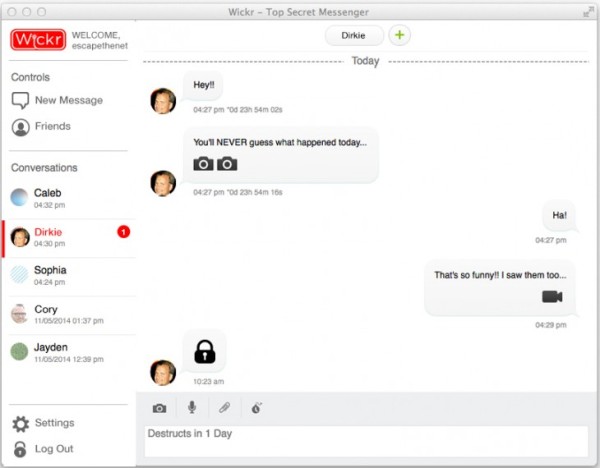
Wickr brings self-destructing secure messaging to desktop

Wickr is moving beyond its iOS and Android apps to bring its highly-secure features to the desktop. The Wickr app is now available for Windows Linux, and OS X. It also has the same self-destruct option for text, images, and videos. And they use multi-layer encryption with AES256 and EDH521 that are not stored on any servers. The desktop versions also take out the metadata and your devices only have the key to read the messages sent to you. You can set a time limit for individual messages as well as wipe them completely from your device. And yes, it will let you chat with 10 people at once, ad-free and it doesn’t track you. It is surely a great option if you want to keep your correspondence with your friends and family just between you guys.

Source: The Next Web

Saturday
Sep202014

PCs get first dibs on iCloud Drive

While Yosemite is getting tweaked prior to its official release, Windows users are getting the rare opportunity to have access to Apple software before Mac users. The updated version of iCloud for Windows adds full support for iCloud Drive. So yes, you can access the files you’ve stored on Apple’s version of Dropbox right from your desktop. Of course, Mac users will gain access to additional iCloud features soon enough. But for now you can enjoy first dibs on the service.

Source: Apple | Via: Engadget

Monday
Jun022014

Asus unveils five-in-one Transformer Book V at Computex

Asus is known to reinvent the hybrid market and one of its newest devices unveiled at Computex certainly lives up to that. The Transformer Book V looks like a regular 3-in-1 device with a laptop, tablet, and smartphone built in. But Asus stepped it up further and added five modes to the device. It can act as a Windows laptop, a Windows tablet, an Android smartphone, an Android tablet (if you dock the smartphone into the tablet), and an Android laptop if you dock the tablet back onto the keyboard. In a nutshell, it is the PadFone and Transformer lines combined. We’re not sure how this will translate in actual use but it does bring even more functionality than you can imagine in a “single” device.

Specs wise, the smartphone has a 5-inch HD display, an unspecified Intel Atom quad-core processor, LTE capability, 2GB Ram, up to 64GB of storage, and an 8-megapixel rear camera and 2-megapixel front camera. The tablet has a 12.-inch HD display, another unspecified Intel Core processor, up to 4GB of RAM, and up to 1TB of storage. It really would’ve been better if the display for both devices were Full HD but we’ll take what we can get this time. We don’t know when this will be available or how much. We will keep you posted for any updates.