




















Review: Adobe Lightroom 3 is the photographer's toolbox
 Wednesday, July 7, 2010 at 11:32AM
  By Gadjo Cardenas Sevilla
Adobe Lightroom 3 ($299) is the quintessential digital photographer’s toolbox and this newest version is even easier to use and offers a host of impressive features that novices and pros alike will find useful. We integrated Lightroom 3 into our workflow as a regular food reviewer and photographer for city culture website BlogTO.
For our restaurant reviews, we photograph restaurant interiors as well as food as it is served. These photos are usually shot as high resolution files and often in RAW format that need to be scaled down to both a web-friendly size while maintaining as much of the detail and vibrancy as possible. We also need to output print quality images (at 300 dpi) for when the blog posts are featured in the T.O.night evening paper each week.

Our usual tool of choice is GraphicConverter for quick edits and to do batch conversions to resize a number of photos to the desired sizes. We also use Adobe Photoshop to “shrink” file sizes while maintaining detail and colour. This usually entails opening files individually in Photoshop 5 and then saving them. This usually trims the file size while maintaining the quality we need.
With Lightroom 3, which works on both Macs and PCs, we find that creating these workflows and getting the desired results was dead easy and fast. We were able to get our workflow set-up together in just a few minutes.
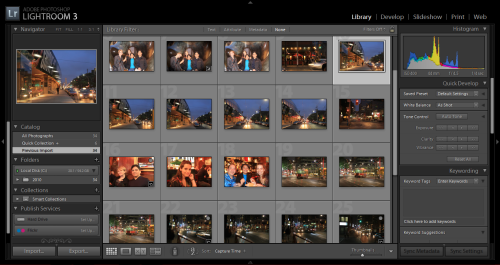
Lightroom divides the stages of your workflow into Library, Develop, Slideshow, Print and Web which covers everything you’d want to do with your digital photos. Most of the functions are clearly visible onscreen without the need to go digging through menus, which is great if you aren’t the sort to read the manual and just want to figure things out on your own.
Library is the asset management portion of the application where all imported photos appear. Here you can review, organize and even make quick edits to your photos. Minor changes in white balance and colour tone can be easily done and this is all realtime so you can quickly assess the accuracy of your edits.
The Develop section offers a wider range of adjustments and control even a stunning dropdown of preset styles for both popular colour and black and white photo treatments. This is all non-destructive editing (meaning you work off copies and not the original image file, that way if you screw up you can always start fresh). You edit photos in RAW and in JPG format here.
Slideshow offers tools and options for exporting your photosets to files, CDs or the web. Print is where you define layout options and preferences while Web is where you prepare for output and create galleries for online viewing.
There are also a number of important and useful improvements such as the ability to automate watermarks into photos. With more people sharing their photos on the web, placing subtle watermarks on them ensures some kind of protection from unwanted use or copying. For Canadian Reviewer, we take a lot of exclusive product and event photos that usually watermark for web use. In the past, we had to cobble together system to watermark the photos and it took a lot of time.
Lightroom 3 makes this easy from the get go. Once you export a photo in a desired format, you can assign text or images to serve as your watermark or copyright. We found great value in this feature and were surprised at how easy it was to use. Seeing all the changes and modifications with a full-screen preview is butter-smooth and you can quickly see changes on a full sized screen.
A number of the features offer more than you’d expect. The cropping tool, for example, also allows you to straighten crooked photos which is extremely convenient specially for photographers who shoot without tripods.
During the weeks we used Lightroom 3, we realized that it had all the features, the power and more importantly the ease of use that we are looking for in an image management program for our professional web and print photography work. It has all the refined power of Photoshop but geared towards managing, enhancing and enabling output quality of photos.
We found that Lightroom 3 completely meets the needs of today’s working digital photographer and manages large collections of photos efficiently as well as offers quick retouching, resizing and output options. Lightroom 3 also has sufficient batch processing capabilities that can save you a lot of time so you can focus more on taking pictures rather than messing about with software.
A great leap forward in image management software, Lightroom 3 is impressive and intuitive and has become our favourite tool to use with our photos.
Rating: 5 out of 5
Reader Comments