


















Review: HTC Flyer 7" inch 16GB WiFi tablet
 Wednesday, June 15, 2011 at 3:04PM
  Text and photos Gadjo Cardenas Sevilla
At first glance, one could find many things wrong with the HTC Flyer WiFi tablet. It runs a non-tablet version of Android, it uses a single-core Snapdragon processor, its screen is only 7" inches wide and it has a $80 digital pen that works mostly on HTC Sense overlay.
So, why is it one of the most desirable devices we've seen in a long time? We spent a week with HTC Flyer and tried to dig deeper.
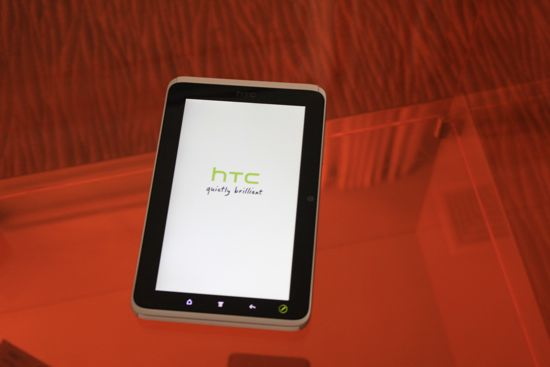
 We picked up the HTC Flyer during a recent trip to the US since it is not available in Canada. Sold exclusively by Best Buy, the WiFi tablet represents HTC's first foray into making something other than a smartphone. You wouldn't know from looking at the HTC Flyer though, it looks like a honkin' big smartphone.

The HTC design language is clearly present in the Flyer ($499 at Best Buy). Their recent preoccupation with unibody aluminum construction (as seen in the HTC Legend and others) has been applied to the Flyer which has a lightweight yet sturdy case that's outfitted with white plastic accents (which we presume hide the Bluetooth, WiFi and GPS antennas).
The HTC Flyer features dual microphones (which are good for recording interviews, more on that later), loud stereo speakers, a single USB port, a 5 megapixel rear camera and a 1.3 megapixel front facing camera round out the physical features.

We started this review by pointing out what we thought some readers would think are the shortcomings of the HTC Flyer but let's look at its obvious advantages.
HTC Sense has been redesigned for the 7"inch form factor and not only does it work really well on the HTC Flyer, it knocks the socks off anything on Honeycomb right now. Honeycomb is Android's TRON-like tablet-specifc OS. We've been using Honeycomb for over a month now on our Motorola XOOM and right now in terms of applications, it is a vast wasteland.
The few apps available for the Honeycomb version of Android are just kind of sad right now. If RIM's PlayBook and Honeycomb ran a contest for the fewest useful apps at the moment, we would have a tie.
Having said that, the smartphone-focused Android apps can still be accessed and they work well but work even better on smaller screen tablets like the HTC Flyer and last year's Android tablet, the Samsung Galaxy Tab 7".
 Running on an overlayed version of Android's latest gingerbread (version 2.3) smartphone OS. There's no indication that the HTC Flyer will receive any Android software updates.
The HTC Flyer's 1.5 GHz Snapdragon processor isn't dual-core kit like most of the newer tablets out there but we found it to be snappy, even if HTC's Sense probably takes up a lot of system resources.
Sense becomes an essential component of the Flyer experience if you are considering the pen. The scribe technology allows for manifold way to interact with the tablet using the pen.
The most useful feature is instant screen capture which happens anytime the pen touches the screen.
This brings us to the second most important feature, Evernote integration on the OS level. Evernote acts as the cloud repository for notes, screen grabs and things downloaded from the Internet.
The pen also makes it possible to annotate and draw on most anything that shows up on the screen as well as highlight text when reading eBooks and even sign virtual documents and PDF's.
HTC allows you to draw, sketch and use the pen in various creative ways that elicit flashbacks to the dark days of PalmPilots and PocketPCs.
Writing on the glass screen with the pen isn't fun.
There's something about the shiny glass (not Corning's Gorilla Glass) and the plastic tip of the sylus connecting that doesn't feel right or natural.
Perhaps it is something we need to get used to, but we found ourselves avoiding having to use the Flyer's pen. Perhaps a matte screen protector might change this perception and improve the experience.
There's also the frustration of thinking that the pen can actually be used to tap on things (It can't, it only works within Sense), so it can't be used as a stylus in that sense so you will still need to get fingerprints all over that screen and it does get very, very smudgy.
A treatment like Apple's oleophobic glass found on the iPad would have been a supremely welcome feature. The addition of a microSD card for expansionup to 32GB is not just a great feature, it should be standard on all tablets an smartphones.
The cameras are decent for what they are but we wouldn't use them as our primary image capture devices. The vide below shows the quality of an HD video taken with the Flyer. Sound is everywhere but that may be a matter of the settings. Video quality is pretty good, for a tablet.
Then, there's the feel of it. You can hold the Flyer in one hand without a problem. But when you hold it with two hands, the slippery nature of the aluminum body plus the slightly curved design make it a challenge. We bought a snap on cover that, while adding to the bulk, protects and makes holding the Flyer a lot easier. These are all things that require getting used to.

Aside from that, we've been looking for opportunities to use the HTC Flyer because it is so darn cool. The size is perfect for reading websites as well as various eBook apps (Kindle, Kobo, Nook, Sony, Google Books, all available on Android). Videos are superb on the brigh screen and while we've mostly used YouTube, it's great to know HTC has a streaming service called HTC Watch.
There are some clever touches that we appreciated as well. The four main Android buttons "home", "menu", "back", and "pen"are touch buttons in the border of the screen. When you go from portrait to landscape, these buttons move along with you, which is intuitive. This does limit the way you flp the tablet to some extent but works fine.
The battery life is above average and we managed 6 hours of heavy use which isn't bad for something this small. Using the HTC Flyer with smartphones that offer wireless hotspot capability works really well.
Conclusion:
Who is the HTC Flyer for? If the RIM's PlayBook is clearly geared at BlackBerry toting business-oriented folk, where does a smartphone-OS powered pint-sized tablet like the Flyer fit in?
We think that Android smartphone users who are already familiar with the OS and who have amassed a number of applications for their phones will benefit from what the Flyer has to offer.
Users who read a lot and want an all-in-one solution for all the eBook formats should consider this (or the Samsung Galaxy Tab 7" which can probaby be had for cheaper now).
Students or people in very specialized fields like doctors or journalists might find that the Flyer's feature set (specially the pen input) might suit their workflow and actually make them more productive. Covering events, for example, we were able to put the camera the dual microphones and the pen function to good use to make quick notes and gather various bits of info.
At $499 though, you'd have to be a pretty fanatical Android user to consider this over the competition. Unless, of course, the 7" inch screen plus pen combination are must-have features and you have no problem running a smartphone OS on something that can't make phone calls.
Rating: 3.5 out of 5
Print Article Permalink tagged Gingerbread, HT Flyer, OS, PEN, Review, Symbian, Xoom, iPad, tablet Email Article in Buyers Guide, Events and Launches, First Looks, Lifestyle, Mobile, News, Opinion, Public service, Reviews, Tablets, Video
Reader Comments