



















Review: Sony Tablet S 16GB WiFi
 Wednesday, August 31, 2011 at 4:47PM
 Text and Photos by Gadjo Cardenas Sevilla
Sony has put an interesting spin on its first and much anticipated Google Honeycomb device. The oddly contoured and shaped much like a folded magazine, Sony Tablet S ($499 for 16GB and $599 for 32GB), actually serves to unify Sony's various product lines and aims to make waves in the tablet space. Does it have what it takes?
The Sony Tablet S will serve as an eBook Reader for the Sony Reader app (and Amazon, Kobo, Barnes and Noble as well as Google Books). It is the first PlayStation Certified tablet so it is expected to be a gaming device or at the least have exclusive access to play 15-year-old games from Sony’s PSOne console and possibly some newer PlayStation Portable games.
 Sony Tablet S and iPad 2 with full screen brightness
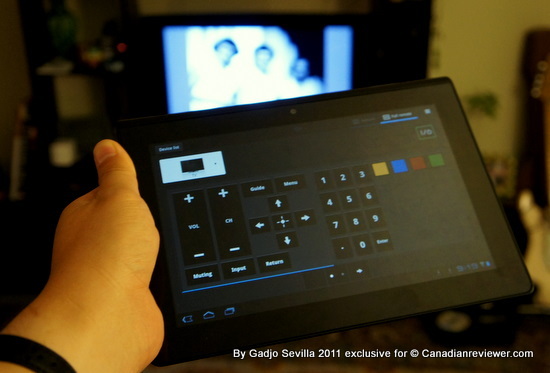
It is also the first tablet in the market we know of to offer IR (Infrared), which makes it possible to use the Sony Tablet S as a universal remote not just for Sony branded components but for anything that is already in people’s living rooms.
(Ed: The new Samsung Galaxy Tab 7.7 apparently offers an IR port as well as a remote control app as well)
Yes, the Sony Tablet S it is an Android Tablet just like any of the multitudes on sale today from rival manufacturers, but it contains myriad functions to set it apart. At least Sony hopes so.
Available in Canada starting September 16, the WiFi-only device has a 9.4-inch screen, weighs 1.33 lbs. and has front and rear cameras. In the Sony Tablet S’s box, you get the AC adaptor with a proprietary charging port as well as a lanyard so you can have the tablet attached to your wrist while you use it. How thoughtful.
 The Sony Tablet S cozies up to the LG Optimus PadThe US will likely see a version that is WiFi and 3G, which makes sense for such a lightweight device, we still cannot understand why Sony refuses to sell its notebooks and now tablets in Canada without the 3G option. This has been going on for years now.
Enabling 3G requires one or two extra components that add less than $40 to the device’s production cost but make it far more compelling.
 PlayStation Certified logo adds promise of true tablet gaming
Still, we found the Sony Tablet S to be an engaging device for new tablet buyers but it will likely compete head on with the Samsung Galaxy Tab 10.1, the Motorola XOOM and the cheaper Acer and ASUS tablets. One thing is for sure, this will not be confused with an iPad.
However, being unique in the expanding tablet space requires more than a Gehry-esque slant on industrial design. Function, which the Sony Tablet S claims to offer in abundance, needs to be compelling and even transformative. Let’s find out if it is.

First Impressions
Out of the box, the first thing one notices about the Sony Tablet S is how feather-light it is. It really almost feels like a hollow piece of plastic. Despite this, the device is finely balanced, extremely easy to hold thanks to hundreds of microscopic studs in the rear shiny plastic.
As a device that is primarily glass and plastic, the S Tablet feels solid but lacks that premium feel and corresponding sense of sturdiness, one gets from metal framed tablets like the iPad or even the BlackBerry PlayBook.
 BlackBerry PlayBook and Sony Tablet S
The rear of the S Tablet is curiously painted in a faux-shiny matte silver colour that is similar to the iPad 2’s brushed aluminum bottom but make no mistake about it, this is plastic and it borders on feeling flimsy.

Beyond the questionable choice of materials, the Sony Tablet S is a wonder of ergonomic design and execution. It feels good in the hand, right even.
The idea of today’s tablets is that they should be able to look and work okay in any orientation and the S Tablet’s wedge design, strangely enough, works well despite the faux-flap look.

Understand that with this tablet, you will never have a flat device and we can see this working well for users who plan to do a lot of typing and need to prop up the device for this purpose. The downside is it will likely only fit Sony branded docks and cases designed for this unique shape.
Speaking of accessories, we got a chance to see the dock that turns the tablet into a Chumby type device streaming news and weather as well as the wireless keyboard that features a variety of Android-specific hotkeys. Good job there, Sony.

Another uncanny thing about the Sony Tablet S is that it is the sort of device you want to keep picking up and touching. Of the dozens of devices we’ve tested, few others have this effect, the iPhone 4 is one and maybe the BlackBerry PlayBook.
Ports and Expansion

The left hand side of the plastic flap houses the microUSB port and a full-sized SD Card slot, which is a welcome sight for users who like to transfer photos or increase the S Tablet’s base memory.
Above that, is a standard headphone jack and below is one of two stereo speakers. The speakers are average in volume and quality, most user will likely prefer to use headphones.
Tucked in the right hand side is the power button, volume keys and a reset indicator as well as the other speaker. We have to mention that the Sony Tablet S has an inficator light that pulses whenever you get an email or notification. This is one bright light and caught us unaware at night when we thought there was a glowing alien in our den where we left the Tablet S.

A bit alarming for a Sony product, especially a multimedia tablet, is the lack of any form of HDMI out for video. Yes, this is a DLNA certified device, and should interface wirelessly with compatible HDTVs, but a simple HDMI port just makes sense and is standard on many Honeycomb tablets.
The 9.4-inch 1,280 x 800 touchscreen features Sony’s TruBlack technology that enhances overall contrast so videos and photos look crisp and saturated. There is a 0.3 megapixel front-facing camera as well as a 5-megapixel rear camera featuring. Picture quality is decent and should yield good pictures in brightly lit situations.

Functionality Strategy
Sony plan to update its Qriocity video rental streaming service in time for the Sony Tablet S, which could make it a viable video playback device. Here’s where that HDMI-out would have proved useful for mirroring video to HDTVs.
The universal remote application of the Sony Tablet S is innovative and seems to work well and will be a feature that others are likely to copy except no other tablet is outfitted with IR today. For home theatre enthusiasts who like surfing the net or tweeting while they watch TV, this is heaven's gift to you.
Setting up the universal remote app is a breeze and works as advertised. This thing managed to hack into our Samsung LCD TV and our Rogers Cable box within minutes and we were soon scanning the vast and vapid landscape of cable tv programming right from the tablet. Users can switch between a gesture-based control or the more preferred and familiar button layout.
We can see a log of geeks taking these things to sports bars and hacking into the video walls and changing channels for kicks. Reminds me of that one Casio watch that had IR built in for changing channels but was used largely for mischief.

The PSOne gaming ability is a bit of a mixed bag. We tried the Crash Bandicoot game (it was one of our absolute favourites back in 1997) and had a hard time getting anywhere with the virtual buttons floating on the screen. The game itself looks terribly jaggy and dated on the Sony Tablet S screen. The pinball game, however, was more than adequate on this screen and quite enjoyable.
The virtual buttons may work better on some games than on others but failed to impress with the included titles. Maybe adding a racing game that used motion control would have been a better freebie.
Still, there is no denying that there is enormous potential for gaming on this device and we hope Sony truly explores this space. With PS3, the Experia Play and with the upcoming PS Vita, Sony has a nice gaming ecosystem going on which could easily make room for the Tablet S.

Sony has also added a choc-full of apps and functionality that we are still checking out and testing. The most important modification is that it used its own Swift Touch technology that speeds up webpage loading, improves response time and makes animation feel more fluid. Because of this, the Sony Tablet S is one of the faster models in the market today.
Conclusion

Sony’s Tablet S is an impressive overall package that brings an above average Android Honeycomb 3.1 experience and functionality plus Sony’s own cachet of games, audio and video content as well as some truly innovative touches into one of the lightest (in weight, not features) tablets we’ve tested so far.
We’re just worried that at an entry price of $500 for the 16GB version and $600 for the 32GB variant, Sony might have priced itself out of the sweet spot for this type of device.
Rating: 4 out of 5
Print Article Permalink tagged Android 3.0. Android 3.1, Google, Honeycomb, PSOne, PlayStation Portalble, Qriocity, Sony S1, Sony Tablet S, Tab, iPad, psp, tablet Email Article in Breaking news, Buyers Guide, Events and Launches, First Looks, Gadjo Sevilla, Lifestyle, Mobile, Opinion, Public service, Tablets
Reader Comments