



















Review: Apple iPad 32GB
 Tuesday, April 6, 2010 at 5:15PM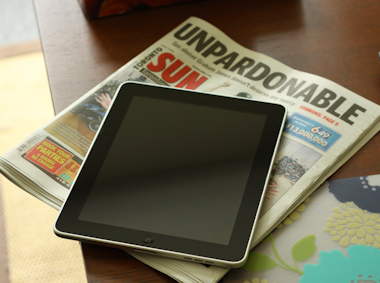
Text and photos by Gadjo Cardenas Sevilla
The iPad isn't due in Canada until "late April" as per Apple's website but this hasn't stopped tech-smitten Canadians from crossing borders, scouring eBay and chancing the grey market to get their hands on Apple's latest toy. An entirely new category of device, the iPad brings with it a lot of promise but also a lot of compromise. Here are our initial impressions.

First Impressions
The 32GB Wi-Fi enabled iPad comes in a small box that can easily be confused with a coffee table book. Inside the box is the iPad, a few loose pages for instructions, a power brick and a USB cord. Apple doesn't include headphones or even a microfiber cleaning cloth with the kit. The cleaning cloth is a must because the iPad attracts fingerprints like nobody's business. Oleophobic or not, the screen is a smudge magnet and seems to like cat fur as well.

The iPad itself is an incredibly sexy piece of technology. It elicits the same awe and wonder as the MacBook Air did when it first came out. We've all seen tablet computers before but we've never seen one like this. The cool and solid aluminum back wraps and tapers around the vast expanse that is the 10'inch touchscreen. The screen is surrounded by an inch-thick black bezel that serves no function except to house the light sensors.

The operating system you get on the iPad is also sandwiched between iPhone OS and Mac OS as it has elements of both like pop-over windows, which are the iPad’s version of right-click option menus. These are subtle and take a while to discover.
Apple thoughtfully ships the iPad fully charged which is great since older computer’s USB ports don't have enough power to charge the iPad when you connect it so you do need the wall plug. Bummer, I know.
You need to plug the iPad into iTunes to get it set up. We moved mostly apps, some movies and a few photos from a previous iPod Touch backup over to the iPad and this took roughly 20 minutes.
There are some iPad-specific apps available on the PC and Mac version of the iTunes store but we were disgusted to learn that the App Store on the iPad itself is not yet available outside of the US.
As a result of this, Canadians who jumped on the iPad bandwagon early have no access to the iBooks store or to the iWork suite of apps for the iPad (which is made of Numbers, Pages and Keynote). You can pretty much do without these but it is still inconvenient. We would have loved to try out iBook store to see if Canadian titles were included.

You do get access to the Kindle App, which is gloriously blown up to iPad resolution. Let's just say that once you see books on the iPad, the Kindle device now looks and feels really old.
Amazon was smart to have provided this option to iPad users. Another interesting book app we tried was Canadian-based Kobo Books which gamely displays titles that are not available in Amazon's Kindle store.

I don't know if its the A4 processor or the graphics subsystem on the iPad but it is one fast device. Everything from loading pages and opening apps is markedly faster than the iPhone 3GS, take into consideration the (much) larger screen real estate that needs to be populated and this is quite a feat. If multitasking will affect the iPad's performance then maybe we're better off without it, just saying.
A lot has been made about the software keyboard and it is usable although It would take some practice to write on it for a prolonged period of time. The Apple accessory stand with the keyboard now looks like a good investment for those of us who are going to do a lot of serious word processing. For banging out 140 character tweets or replying to emails it will do fine.

The 1024x768, 9’7-inch screen on the iPad is phenomenal. We watched the slick YouTube trailer for TRON: Legacy and episodes of the gory Spartacus: Blood and Sand and they were crisp and vivid even at the lowest brightness setting. How is this possible? Apple's iPad uses IPS LCD screen technology offers much wider viewing angles and substantial brightness while consuming less power.
The iPad will run most of your iPhone apps and games natively but they will appear as actual size apps, meaning they will be small. You can upscale these to 2x the size but the graphics and the text will be jagged and blurry.
It is with video that you realize the lack of Flash in the iPad is going to be a hassle. Yes, a lot of websites are switching from Flash to HTML5 and other Apple friendly technologies to enable video on the iPad but there are gazillions of websites out there that rely on Flash just to show content so its an uphill battle.

The iPad will run most of your iPhone apps natively but they will appear as actual size apps, meaning they will be small. You can upscale these to 2x the size but the graphics and the text will be jagged and pixelated and pretty much look like crap (see NBA game above).
Blown up apps look and feel ridiculous on the iPad and we hope that developers offer easy upgrades to iPad-specced versions of their apps without charging too much money.
The Internet, in your hands
We spent most of our time on the iPad with the Safari browser which is stellar on the iPad. If there's an inherent game-changing feature in the iPad it is how it relates web surfing to the form factor. How the screen manages to reveal entire webpages in your hand in such crisp and functional detail is simply awe-inspiring. Multi-touch is the best way to navigate the Internet and multi-touch on the iPad just works.
Some of the best apps we've seen are content apps from New York Times, BBC, Thomson-Reuters, Associated Press and USA Today. As a former newsprint-loving newspaper editor, it gives me goosebumps to see how news and features have been re-envisioned for this new medium and clearly the future of publishing is here, before our eyes.

The New York Times takes the most traditional approach with the columns and layouts people are familiar with but touch around and pictures come to life in the form of video clips while links and reference points are easily accessible for readers who want to dig deeper. Soon, the iPad itself fades from the experience as it is just you, the reader and the words and images on the page interacting like never before.

Reuters takes the more modern approach and layout which handles headlines and charts a bit better. All of these news apps are fast and efficient and morph to suit either the horizontal or vertical orientation of the iPad. If these are the early efforts in content design for the iPad, we can't wait to see what the future has in store.

Battery life is really, really good. Even after extensive Internet use over six hours while listening to podcasts and music, the iPad had about 70 per cent battery left. This is truly an all-day device but we fear that the 3G version, with its additional radios for Cell and GPS will likely eat through the battery much more quickly.
Interested iPad buyers should set aside some extra cash for a screen protector (preferably matte), a nice sleeve or slipcase and most likely a stand/charge combo. The 1 and a half pound iPad is light enough but one gets tired of holding it up for prolonged periods of time. Apple should have included some sort of stand or even a cheap plastic dock in the box.
We'll end this review while we continue to test the iPad. So far we're loving it but are still figuring out how it fits in between our computer and smartphone, it's certainly more engaging and by far more fun to use but we realize there's just so much to discover
The iPad is great for light computing, email and gaming on the go. It is a capable eReader device and a superb video and music playback device. Developers now have the challenge of carrying the device beyond fad gadget status into a true computing platform.
This makes the iPad exciting not just for what it is now but for all the ‘magical’ and ‘revolutionary’ things it can still become.

Gadjo Cardenas Sevilla
Notes for Canadian early adopters:
- You can't access the iPad's App Store as it is not available in countries outside the US. iPad apps need to be downloaded via your computer and then synched into the iPad.
- For some reason Apple's own apps (iBooks, Pages, Numbers and Keynote for iPad) are not available on the app store for Canada.
-The iTunes Music and Movie Store, however, can be accessed and you can buy songs, movies and TV shows directly from the iPad.
- Some app developers slipstream iPad versions of old iPhone apps at no extra price. Kudos to Evernote, Bloomberg and Amazon for thinking about their users and surprising us with well implemented iPad apps.
Reader Comments