


















Review: 21" inch Apple iMac with Core i5 Intel Processors
 Monday, July 4, 2011 at 7:18AM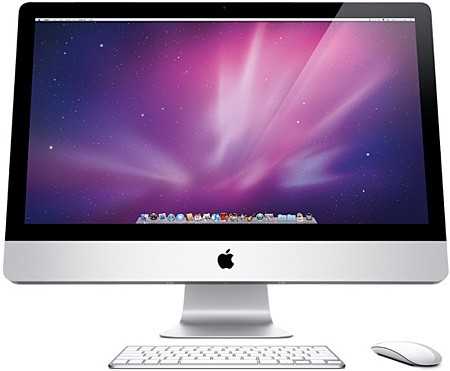
By Gadjo Cardenas Sevilla
With Intel's blistering Quad Core processors, a spanking new Thunderbolt high-speed optical I/O, Apple's consumer all-in-one edges ever closer to the performance and versatility of a powerful professional workstation while maintaining a small desktop footprint. Just how improved is the new iMac? We find out.
Apple's iMac ($1,200 starting for the 21" inch model, $1,700 starting for the 27" inch model) has sure come a long way. The all-in-one consumer desktop has been the company's most popular desktop since it was introduced in 1998.
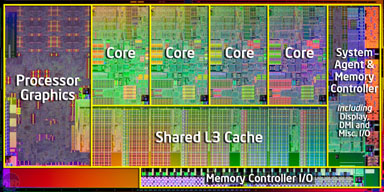
For 2011, recently updated with Intel's Sandy Bridge architecture offering a selection of Quad Core i5 processors (from 2.1GHz to 3.1Ghz), up to 16GB of RAM and the new Intel Light Peak (Thunderbolt) high-speed optical interface for data transfer.
The iMac is now a compelling workhorse for most CPU intensive tasks while remaining in the consumer desktop space in terms of price.
The new iMacs are also all-wireless. Which means the only cable they ship with is the power cable and both the keyboard and the mouse (or if you prefer the trackpad) are connected via Bluetooth. This brings the iMac's tenet of minimalist simplicity to a new level.
Set up
Setting up a new iMac is still one of the easiest out of box experiences. It really is a plug-in and play affair and since Apple makes both the hardware and the software, the experience continues right after you first turn the device on.
You aren't presented with nagging windows, scary "install your antivirus software now!" prods or tedious extraneous software overlays running on top of the OS. Sign in, register and you're good to go.
Setting up a new machine without a wired mouse or keyboard, however, might be a bit of a challenge for some users, we're fairly experienced and still found it tricky to get going.
If you have a wired keyboard and mouse hanging around, it is best to keep them until you've gone through the intiial set up process and then go wireless.
Under the Hood
On the surface, the new 21-inch iMac we reviewed is identical to the model it replaces and looks like any iMac from the past 2 years. It is still an elegant machine, understated yet refined from constant minor revisions and tweaks.
Most of our initial work on the machine was done through the browser as well as the iPhoto app and we found it to be quick and very responsive.
The beauty of the new Quad Core architecture is that the system can use as few or as many cores as are needed and this becomes evident when taxing the system with more complex programs. For most processes, the iMac is very speedy, it is great that Apple preloaded 4GB of RAM to move things along quickly although more demanding users can add up to 16GB of RAM if needed. Build to order 27-inch versions of the iMac can be outfitted with an even faster Intel Core i7.
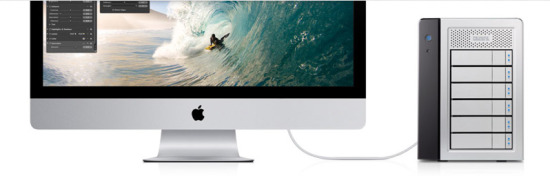
What is a bit of a challenge is uprgading the hard drive. Apple's new iMac desktop line features a new custom 7-pin serial ATA connector and proprietary temperature control system that will make hard drive upgrades difficult for end users. So options are pretty much limited to external drives.
 iMovie and Final Cut Pro X both ran exceptionally well on the iMac which was not surprising since these are Mac OS native apps yet our review unit was out of the box stock and had not been tweaked or upgraded in any way.
Rendering video, usually the most processor intensive part of video production was remarkably faster than our production MacBook Pro which has more RAM but an older Intel Core 2 Duo chipset.
The iMac does run hotter than previous models we've tested but the complex labyrinth of heatsinks and fans manages to diffuse the heat and keep things relatively silent.
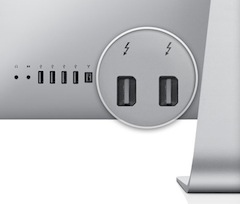
Most computers today would have USB 2.0 (4 megabytes per second) and USB 3.0 (5 gigabits per second) ports so once 3rd party drives and devices come to market people like video editors and photographers will have the fastest connectivity possible. The Thunderbolt interface can push data (and video) at 10 gigabits per second.
Apple now sells Thunderbolt cables ($50.00) and some of the third party drives are just starting to come out. it isn't cheap but like with most things in tech, we expect competition will drive pricing down, in time. We didn't get to test the Thunderbolt cable nor a Thunderbolt drive as they were not out yet during our time of testing.
Conclusion
Even without the Thunderbolt interface, the new processors alone make it a great upgrade over the previous version.
The wireless keyboard and mouse remove the remaining clutter and you now have just one required cable (for power). The higher end 27"inch model with the Intel Core i7 Quad Core processor can keep up with higher end desktops that cost significantly more.
It would have been nice if Apple included a Thunderbolt cable as well as the Apple Remote control with the iMac.
For $1,200, the new 21" inch iMac is ideal as a home desktop, a production workstation (provided expansion upgrades are not required) or an all-in-on for students who need a productivity and entertainment computer that can run OS X and, if needed, Windows 7.
Rating: 4.5 out of 5
Reader Comments