



















A Windows 8 Primer
 Thursday, October 18, 2012 at 2:05PM
 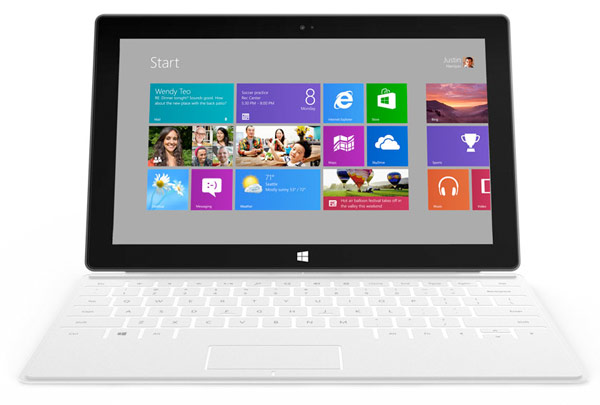 Available in 2 flavours, Windows 8 RT will be a scaled down ARM version for tablets while Windows 8 Pro will run old Windows apps
By Gadjo Cardenas Sevilla
Windows 8, which begins shipping on October 26th and will cost most users $39.99 upgrade from Windows 7, will be the biggest change to Microsoft’s desktop operating system since Windows 95. Bringing in the look, feel and functionality seen in Windows Phone will make it the most touch friendly desktop OS.
The change will be dramatic since Windows 8 will be very visually different from all the previous versions of Windows. Taking on the “Metro" tiled look and feel of Windows Phone, which originated from Microsoft’s discontinued Zune media player.
Two flavours of Windows 8
Windows 8 will be available in two versions. The first is Windows RT which is a tablet optimized version of Windows Phone 8's OS. This means that Windows RT will not run any of the Windows 7 or older applications but will run modified versions of Windows Phone 8 apps. Think of Windows 8 RT as the iOS or the Android version of the OS. There are reportedly around 100,000 Windows Phone apps.
Windows 8 Professional is the PC version that will run on Intel and AMD powered PCs and notebooks and is the step up from Windows 7. Windows 8 Professional should easily run all the existing Windows 7 and earlier software.
To get a more comprehensive idea of the difference between the two devices, check out this comparison from Microsoft.
Touch-optimized OS
For tablets like the Microsoft Surface and other touch-enabled devices, the new Metro interface makes it easy to navigate through apps and files which are just two clicks away. For desktop users or even notebook users using mice or trackpads, this may take some getting used to.
The good thing about Windows 8 is that while it is newer than Windows 7, Microsoft claims that it is actually less resource intensive than its predecessor. As a result, the system requirements for Windows 8 are surprisingly reasonable.
Microsoft recommends:
- 1 GHz or faster processor
- 1 GB RAM (32-bit) or 2 GB RAM (64-bit)
- 16 GB available hard disk space (32-bit) or 20 GB (64-bit)
- DirectX 9 graphics device with WDDM 1.0 or higher driver
This means a Windows 7 or even a Windows Vista rated PC should run Windows 7 surprisingly well and users of older versions of Windows (like Vista) will likely feel like they've upgraded to a whole new machine.
The iconic Windows “Start” bar is gone, so for millions of Windows XP, Vista and Windows 7 users who are used to navigate this way, they will need to get used to how things work. It will still be possible to jump into the traditional desktop look and feel but this will not be the default setting since Microsoft is really pushing its Metro tiled look.
Still, there are some benefits to upgrading to Windows 8. It brings vast performance improvements and can run optimally even on older hardware. Microsoft has streamlined the code in Windows 8 and as a result it should offer a smoother overall experience over Windows 7.
Tablet and netbook uses who upgrade will see a marked difference in overall performance despite their devices’ lower specs. This is great because it gives these older devices a new lease on life with the latest and greatest Windows software.
Live Tiles front and center
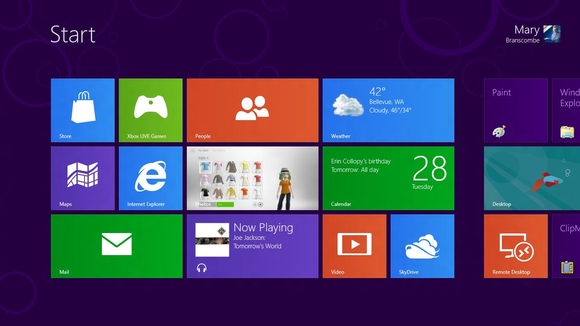
In Windows 8, all devices will first have a lock screen which will feature a large screensaver or wallpaper, the time, date and various icons representing unread emails, messages, tweets or calendar events.
This gives users a taste of the “Glance and Go,” nature of Metro and the entire Windows ecosystem. In order to unlock the screen, you can opt to use an old school password or, if you have a touch screen or trackpad, use a specific gesture to get into the home screen.
The Home Screen will be completely different from any Windows screen in the past. Gone is the Start bar as well as the folders and icons that have been the starting point of desktop computers since the 80’s.
Instead, Windows 8 users will be greeted by the Start screen which is a colorful cornucopia of animated squares. Each of these squares corresponds to an application, a shortcut, a link or a person from your contact list. Being live applications, the livetiles will pulse with the latest updates (i.e. number of mail messages, new Tweets, the current weather
The entire movement of the Live Tile block is horizontal. Click on a live tile and you will be instantly transported to the app or shortcut you need to get to. The transition is a bit flashy but not at all laggy, unlike opening an application on Windows 7 which usually means a minute of waiting for the app to properly load.
Designed for Tablets and Touch
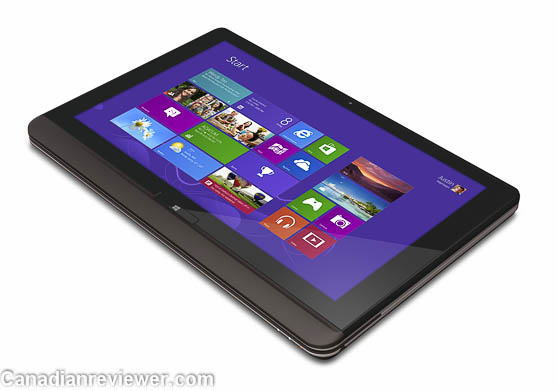
On a tablet or multi-touch enabled display, which is what Microsoft hopes most people will eventually run Windows 8 on, the apps will run on full-screen mode with some of the navigation and controls running hidden on the right hand side. These can easily be accessed when needed but stay out of the way most of the time.
What about multiple windows and overlaying them for true multitasking. This will be available in another form for Windows 8. Users will be able to run various apps side by side and can dock one window on half the screen and another window on the other so they can IM while typing up a blog post or answering email.
The Internet Explorer browser on Windows 8 is a totally different beast than in previous versions. It is designed from the ground up for multi-touch and gesture control. So, pinching and zooming is more receptive and accurate.
A Windows Store on your PC
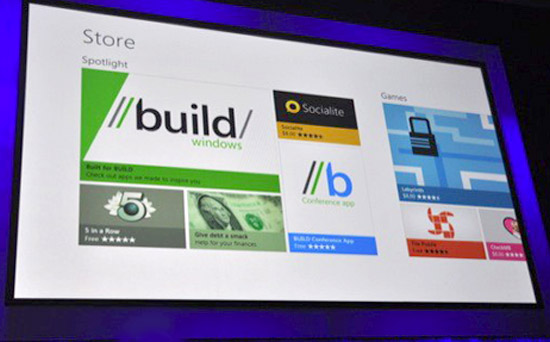
Windows 8 really goes “post-PC” by offering the Windows Store. Just like all the app stores on the mobile operating systems on smartphones and tablets, the Windows Store is an app that allows users to search for and buy Windows 8 compatible applications and programs.
No more installing from CDs, DVDs or USB sticks! The Windows Store will serve as a payment and fulfillment hub for apps and games which download directly into the PC or tablet.
The best thing about this model is that it keeps everything fresh and updated. Just like how System Updates are automatically downloaded on PCs, any update on any app purchased via the Windows Store will be automatic as well.
The Windows Store eliminates the tedious burning to a DVD, packaging, storage, transportation and waste that traditional boxed software brings. It also eliminates piracy since you get software from the source and it is linked to that one machine or PC. It should result in cheaper software for users that is accessible quickly. Just pay, download and install.
This poses a challenge to developers and independent programmers who now need to get in with Microsoft to access the user base. I am sure you can still install apps without the Windows Store but users might stay away from these unapproved apps.
Cloud Computing is here
Cloud integration via Microsoft’s various services like SkyDrive and Office 365 will be one of the biggest changes to Windows. Microsoft is starting to move to an app-rental model where paying a subscription will give users access to Microsoft Office apps in the cloud which they can access on any device provided they sign in with their credentials.
The prospect for cloud computing brings a lot of potential for running secure, multi-user and remote software that keeps files and applications free of potential viruses, errors and data loss. Having multiple copies of a document you are working on allows instant saving to the cloud and the ability to work on the same projects on different devices without having to install the applications over and over again.
Other superb features of Windows 8 include system-wide spellchecking, an improved search feature that scours anything from music and media, contacts and the web. For purists who use multiple monitors, who can’t live without the classic Windows look and feel, they will be able to run Metro on one monitor while having the classic Windows desktop on another.
So, that is Windows 8, the most revolutionary change to Microsoft’s operating system since the 80’s. A true post-PC OS that will work on tablets and desktops, it remains to be seen if most Windows loyalists will adjust and adapt to this brave, new OS.
More Microsoft Surface and Windows 8 Coverage
Surface Tension: Microsoft Fails to deliver on Canadian and UK preorders, offers $50 coupons instead
First Impressions of Windows 8
Video: A bit more on Microsoft Surface
SlideShow: The many faces of Microsoft Surface
Microsoft, Partnerships and the Price of Progress
Where to buy Microsoft's Surface tablet tomorrow
Microsoft Thinks $499 for a Windows RT Surface tablet is a good idea
Microsoft launches its own Windows 8 tablet, calls it Surface
Reader Comments