Feature Stories

Samsung Galaxy Note Review

Sony NEX-7 Review

Motorola Pro+ 4G

Google Galaxy Nexus

LG Optimus LTE

HTC Raider

Apple iPhone 4S

Samsung Galaxy S II X 

Acer Iconia Tab A100 7"

Sony Tablet S 16GB WiFi


Samsung Galaxy Tab 10.1 4G Review

HTC Flyer Review

BlackBerry PlayBook Review

Motorola XOOM Review

Google Nexus S Review

Apple iPad 2 Review

10-inch tablet shootout!

Recent Visits


Search

Recent Reviews 

Cygnett Apollo Hybrid iPhone 4 case

Dell XPS 14Z Notebook

OlloClip Quick Connect Lens for iPhone 4

Kogeto dot 360' iPhone lens

FujiFilm X10 Camera

ClamCase Keyboard Case for iPad 2 

Toshiba Satellite Z830 Ultrabook

Nikon CoolPix S1200pj camera

Evolution Robotics Mint Plus Robot Cleaner

Acer S3 Ultrabook 

Freehand Powerstretch 5 Gloves

Kobo Vox Reader

Sony NEX-7 camera

Freehand Powerstretch 5 gloves

Toshiba Satellite Z830 Ultrabook

Acer S3 Ultrabook

Mint Plus Robotic Cleaner

Samsung Galaxy Nexus

HTC Raider

HTC Jetstream Tablet with LTE

LG Optimus LTE smartphone

Panasonic Lumix GF3 M43 Camera

Sandisk Memory Vault 16GB

Forza Motorsport 4

GarageBand for iPhone/iPod

Apple iPhone 4S

Olympus E-PL3 Micro Four Thirds camera

Nokia X7 Symbian Smartphone

Samsung Galaxy S II X Hercules

LG Optimus 2X Android smartphone

16GB Lexar Echo USB ZX backup drive

Kobo Reader Touch Edition

Apple MacBook Air 11-Inch (2011)

Bracketron Back-It iPad Case

Sony Ericsson Xperia mini pro

Samsung Galaxy S II 4G 

Fujifilm XP20 camera

Samsung NPQX411 Notebook

LG Optimus Black Skype Edition

HP TouchPad Tablet

Kobo Reader Touch Edition

Toshiba Camileo BW10 video camera

Otterbox Defender Series 

21" inch iMac with Quad Core i5 processors

HTC Wildfire S

Aviiq SmartCase for iPad 2

Blaq Twitter app for RIM PlayBook

Motorola DEFY smartphone

Samsung Series 9 Notebook

HTC Flyer 7" inch Android Tablet

Fujifilm F550EXR 16 Megapixel GPS camera

Lapdock notebook dock for ATRIX

Motorola ATRIX smartphone

Casio TRYX Camera

BlackBerry PlayBook

Motorola XOOM WiFi Android Tablet

3 Canadian TV iPad apps

Samsung SH100 WiFi enabled camera

Nokia C7 Symbian smartphone

HTC Incredible S smartphone

Samsung NX100 digital camera

TomTom GO 2505 GPS

Kodak Pulse W1030 digital frame

Google Nexus S smartphone

Apple iPad 2

Samsung 650 Series 55-inch HDTV

Samsung Galaxy S Fascinate smartphone

iSkin ProTouch Classic keyboard protector

Lexmark Genesis all-in-one printer

Toshiba Libretto W100 subnotebook

HTC HD7 Windows Phone

Mac App Store

Kinect Adventures on Xbox 360

Toshiba 46WX800U LED 3D HDTV

Incipio Feather Case for MacBook Air

Samsung SF510 Notebook

HP Photosmart eStation C510

Microsoft Kinect

HP Palm Pre 2

MacBook Air 13-inch (2010)

Boomphones headphones

Mophie Juice Pack Air for iPhone 4

Incipio hard case for Samsung Galaxy Tab

Victorinox Flash Flight Alox drive

Kindle 3 Leather Cover

Samsung EX1 10 Megapixel camera

Acer Aspire 13.3 inch notebook

Sony Alpha A55 DSLR

Gran Turismo 5 (PS3)

Sony Bloggie Touch 

XM SkyDock iPod/iPhone adapter

Apple TV (2010)

iPad apps: Aweditorium

HTC Desire Z Android smartphone

Nokia N8 Symbian smartphone

RIM BlackBerry Torch

Motorola i1 push-to-talk Android Phone

LG Optimus 7 Windows Phone

Samsung Galaxy Tab Android Tablet

Toshiba Tecra R700 notebook

Kobo Wireless eReader

HTC Surround

Windows Phone 7 smartphone OS

Netflix streaming video service

Office for the Mac 2011

Apple MacBook Air (Late 2010)

Nokia C6 Symbian Smartphone

HP Photosmart D100a printer

Incipio Premium Kindle 3 Case

Amazon Kindle 3

iSkin Solo case for iPhone 4

iSkin Revo 4 Case for iPhone 4

CityTV Video App for the iPad

Sony Ericsson Experia X10 Mini

iPod Nano 6th Gen

Sony Ericsson Xperia X10

Samsung Galaxy S Vibrant

Apple iPhone 4 

Motorola FLIPOUT on Rogers

Samsung NX 10 Hybrid mirrorless Camera

Olympus E-PL1 Micro Four Thirds Camera

Four iPhone 4 Cases in $30 range

iPhone 4 Ballistic HC series case

Sharp Quattron LE810 HDTV

Coverage

« Review: Forza Motorsport 3 for Xbox 360 | Main | ReviveLITE iPhone/ iPod Portable Charger - Review »
Monday
Nov092009

Apple melds trackpad and mouse with Magic Mouse

By Gadjo Cardenas Sevilla

Apple’s history of mouse making comes with a few hits and many misses. The company’s penchant for sleek and intelligent industrial design seems to fall short when developing such oddities as the hockey-puck mouse and the recently discarded Mighty Mouse, whose tiny scroll ball easily gooped up with dust and dirt. That, plus Apple’s stubborn refusal to add a right-click button, hasn’t made their mice very popular but this may likely change.


Their recently released Magic Mouse, which ships free with every new iMac or can be bought standalone for $69.99, is a Bluetooth powered, multi-touch mouse that builds on the iPhone’s touch-centric ease of use. Redesigned to integrate the form factor of a wireless mouse with the functionality of trackpad, the Magic Mouse pushes the boundaries of what a mouse can accomplish.
 

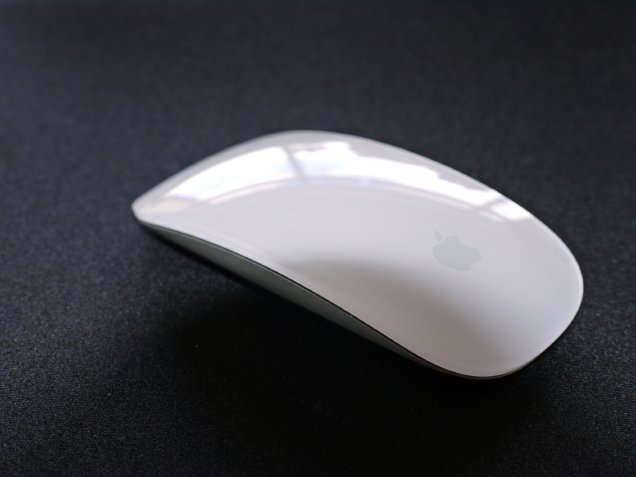
One of the few Apple devices (together with the Mac Mini and the MacBook) that still sports the glossy white Lucite and aluminum finish, the Magic Mouse is curvaceous, shiny affair sports an unusual shape that makes it look almost like half a regular mouse.


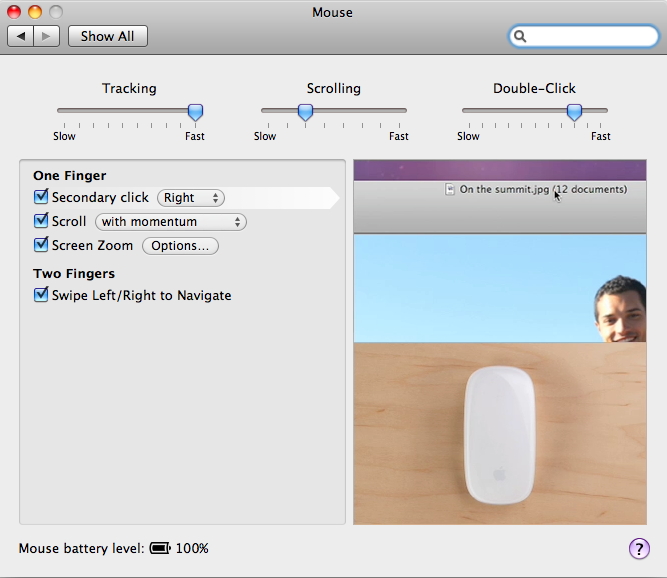
Apple’s obsession with having only one button in its devices continues with the Magic Mouse, which is essentially one big button. The ability to right-click, swipe, scroll up, down and sideways is done through multitouch with one, two or three finger combinations.


Scrolling with momentum is particularly useful feature when dealing with long webpages or documents.  This feature allows you to vary the scrolling speed with by the amount of force you apply on the surface.


Multitouch functionality on the Magic Mouse is really useful, specially when using software that allows these sleight of hand gestures but you will quickly miss the secondary buttons that enable special features such as the Mac’s Exposé function that gives you access to all the open windows with one click. One feature that is in Apple track pads and the iPhone but missing in the Magic Mouse is the pinch-to-zoom and rotation features.


We did find the tracking action to be a bit slow and this is despite setting it at the highest speed. Here’s hoping that future software updates will turbocharge the Magic Mouse. It is easy to get used to the gestures that enable the Magic Mouse to scroll, navigate and move around on long pages as these are intuitive.


The big caveat here is that the Magic Mouse is limited to work on Macs with Leopard and Snow Leopard OS. So Windows and Linux users as well as Mac users on older operating systems are sadly out of luck. Bluetooth mice are also notorious for connectivity issues which explains why there are so few of them running around in the market today.


Reader Comments

There are no comments for this journal entry. To create a new comment, use the form below.

PostPost a New Comment

Enter your information below to add a new comment.

My response is on my own website »
Author Email (optional):
Author URL (optional):
Post:
 
Some HTML allowed: <a href="" title=""> <abbr title=""> <acronym title=""> <b> <blockquote cite=""> <code> <em> <i> <strike> <strong>